Payment history
Check the payments of the workspace and download their receipts
The payment history gathers the payments of the purchases of credits of the active workspace, with their amount broken down. From here you can download the receipt of each payment.
Only the owner and the admins of the workspace can see it.
Check the payments
- Select your name, at the bottom of the sidebar, and then Settings.
- In the settings menu, select Payment history.
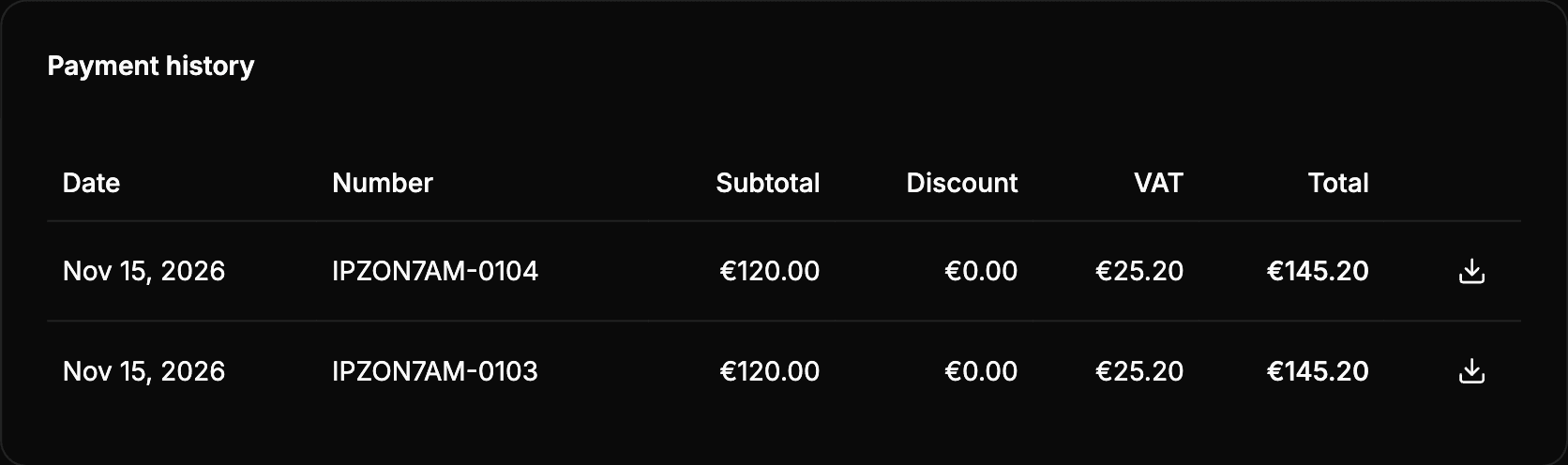
Each row is a payment, from the most recent one:
| Column | What it shows |
|---|---|
| Date | The day of the payment. |
| Number | The number of the invoice. Use it if you need to ask Wheelop about a payment. |
| Subtotal | The amount before discounts and taxes. |
| Discount | The discount applied with a promotion code. |
| VAT | The tax applied. |
| Total | The amount paid. |
The list shows 10 payments. To see the previous ones, select Load more.
Download a receipt
In the row of the payment, select the download icon, on the right. The receipt of the payment is downloaded as a PDF.
Only completed payments with a total above zero have a receipt: a payment that a promotion code brings to zero has no download icon.
If the download fails, the notice The receipt could not be downloaded. Try again in a few moments appears.
Keep in mind
- To change the details shown on the invoices of your next purchases, see Billing details.
- If you have not made any payment yet, the list shows No payments.